How to Build an LED Poster Display
LED poster displays have become one of the most popular digital signage solutions for retail stores, shopping malls, exhibitions, hotels, airports, and corporate lobbies. Compared with traditional LCD posters, an LED poster display offers higher brightness, seamless visuals, a longer lifespan, and flexible content management.
But how is an LED poster screen actually made?
The manufacturing process mainly consists of hardware assembly and software configuration. Most commercial LED poster displays feature an integrated modular design that combines a slim profile, frameless appearance, and intelligent control system. Here's a complete overview of how an LED poster display is built.
Step 1: Hardware Assembly
Determine the Screen Specifications
Every project begins by selecting the appropriate display specifications based on the installation environment and viewing distance.
Key considerations include:
- Screen size
- Pixel pitch
- Brightness
- Installation location
For most indoor advertising applications, manufacturers recommend P1.8 to P2.5 pixel pitch because it delivers excellent image clarity for close viewing.
Prepare the Core Components
Once the specifications are finalized, the necessary hardware components are prepared.
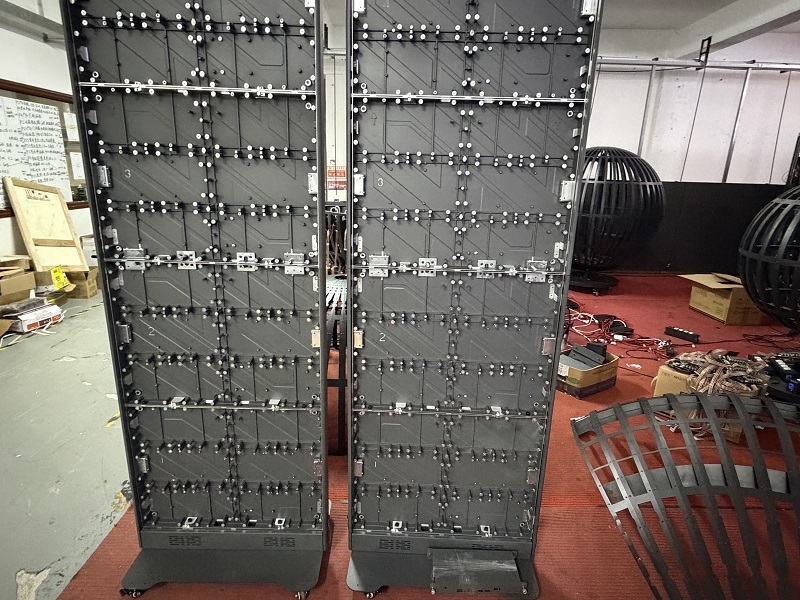
A typical LED poster display includes:
- LED display modules
- HUB connection boards
- LED receiving card
- Power supply
- Aluminum cabinet
- Signal and power cables
- Protective front panel
High-quality components improve display performance, reduce maintenance costs, and extend the product's service life.
Assemble the LED Modules
Technicians install the LED modules inside the custom aluminum cabinet using either magnetic mounting or screws.
After securing each module, they connect:
- Power cables
- Signal ribbon cables
- HUB boards
Many commercial LED poster displays also include an acrylic protective front panel, which helps protect the LEDs from dust, accidental impact, and everyday wear while maintaining excellent visual clarity.
Install the Base or Mobile Stand
Unlike fixed LED walls, poster displays are designed for portability.
Manufacturers typically install:
- Rolling base with caster wheels
- Floor-standing support frame
- Stable mounting bracket
This design allows users to move the display easily between different locations.
Step 2: System Configuration and Screen Calibration
After completing the hardware assembly, technicians configure the display's control system.
Connect the Control System
The LED controller (sending card) communicates with the receiving cards installed inside the display.
Once connected, the entire system is powered on for testing.
Calibrate the Display
Professional LED software is then used to configure the screen parameters.
Popular control platforms include:
- NovaStar
- Linsn
- Colorlight
- Huidu
During calibration, technicians adjust:
- Brightness
- Color temperature
- Gray scale
- Refresh rate
- Resolution mapping
Proper calibration ensures smooth video playback, accurate colors, and uniform brightness across the entire screen.
Step 3: Content Creation and Publishing
Once the display is fully configured, it is ready to show digital content.
Design Advertising Content
Designers create promotional posters, images, or videos according to the display's native resolution.
Common content includes:
- Promotional advertisements
- Product launches
- Brand campaigns
- Event information
- Interactive marketing content
Optimizing content for the screen's resolution ensures the best visual performance.
Upload and Manage Content
Modern LED poster displays support multiple content management methods.
Users can upload media through:
- USB flash drive
- Wi-Fi
- Ethernet connection
- Cloud-based management platform
Many commercial LED poster displays also support remote content management, allowing operators to:
- Update advertisements remotely
- Schedule playlists
- Control multiple displays simultaneously
- Set automatic power-on and power-off times
Cloud management greatly improves operational efficiency, especially for businesses managing displays across multiple locations.
FAQS
1. What pixel pitch is best for an indoor LED poster display?
For most indoor applications, a P1.8 to P2.5 pixel pitch offers the best balance between image quality and cost. If viewers stand very close to the screen, a finer pixel pitch provides sharper text and more detailed images.
2. Can an LED poster display be moved easily?
Yes. Most commercial LED poster displays are designed with mobile bases and caster wheels, making them easy to relocate. This makes them ideal for retail stores, exhibitions, shopping malls, and temporary events.
3. How do I update content on an LED poster display?
Modern LED poster displays support multiple content management methods. You can upload images and videos via USB flash drive, Wi-Fi, Ethernet, or cloud-based management platforms. Many systems also allow remote scheduling and centralized control of multiple screens.