Spherical LED Display Pixel Pitch Selection: How to Match Resolution With Sphere Diameter

A globe animation can look smooth on an LED sphere while the city names in the same clip are hard to read. The animation uses broad shapes. The labels depend on small letters and thin lines. Choosing a spherical LED display pixel pitch starts with the smallest detail people need to see and where they will be standing. Sphere diameter then helps determine how many pixels are available to show that detail.
Why Pixel Pitch Selection Is Different for Spherical LED Displays
Pixel pitch is the distance between the centers of neighboring pixels. A finer pitch fits more pixels into the same area. On a sphere, the viewing angle also changes across the image. A logo facing the viewer can look clear while the same logo appears narrower as it moves toward the visible edge.
This matters when a message wraps around several curved modules. The sphere may have a high total pixel count, but a line of text uses only the pixels in the part of the surface where it appears. Check how much of that area the audience can see clearly.
Understanding the Relationship Between Sphere Diameter and Resolution
At the same pitch, a larger spherical LED display diameter gives you more pixels around the equator. For an early comparison, divide the equatorial circumference by the nominal pixel pitch. Use millimeters for both measurements.
Estimated pixels around the equator = π × sphere diameter ÷ pixel pitch
| Sphere diameter | Pixel pitch | Estimated pixels around the equator |
|---|---|---|
| 2 m | P2.5 | 2,513 |
| 2 m | P5 | 1,257 |
| 4 m | P5 | 2,513 |
The 2 m P2.5 and 4 m P5 options have similar estimated equatorial counts, while the P2.5 option has higher local pixel density. To confirm the actual LED sphere resolution, ask for the active pixel count, module layout, and recommended content canvas dimensions. These dimensions tell the content team what frame size to use when preparing media.
Comparing Pixel Pitch for Different Viewing Distances
Measure from the viewer to the nearest part of the display surface. For a suspended sphere, also check balconies and upper-floor walkways. A display high above the ground may still be close to visitors on the next level.
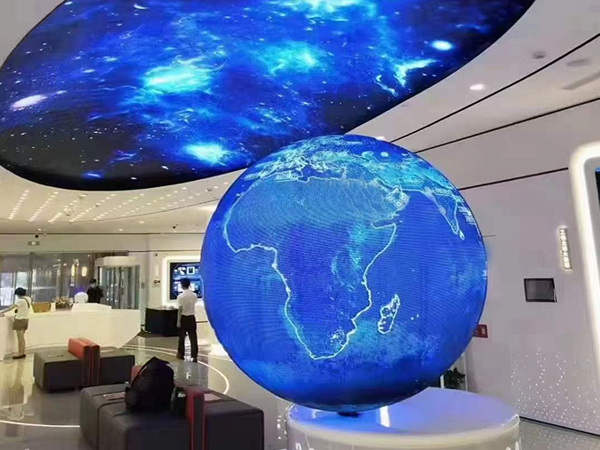
For a slow-moving globe viewed across an atrium, a 2 m P5 sphere is one option to test. If visitors will walk right past the same display and need to read place names, compare P5 with a finer pitch using the same clip. Check the closest viewing position for visible pixel spacing and the typical viewing position for text readability.
Evaluating Image Detail Across Curved Surfaces
Industry coverage of APEC 2026 in Shenzhen described how Leyard’s welcome banquet visuals ran across a main stage screen, a choir area, and side screens. The report also noted that NovaStar provided video processing and display control at several venues. For a sphere, the same planning question applies on a smaller scale. Where will each part of the image land when the content plays on the actual display layout? APEC display industry coverage
Start with a grid and a circle on the proposed pixel map. Look for uneven lines near the poles and visible breaks at module seams. Then play your own clip and pause on its most detailed frame. Check whether thin strokes remain intact, labels are readable, and graphics move smoothly across seams. Repeat the check from the front, the side, and any upper floor with a clear view.
Matching Pixel Pitch With Content Requirements
Choose the pitch using the frame that asks the most of the screen. Slow animation and broad color transitions usually need less detail than a map with place names or a product video with fine lettering. Test the thinnest part of a logo at the size it will appear during playback.
For a retail sphere, place a short product name where it faces the main approach. If shoppers come from two directions, repeat the message in two viewing zones so each group can read it as they pass.
Spherical LED Display Pixel Pitch Selection Checklist
| Selection item | What to confirm |
|---|---|
| Sphere diameter | Finished outside diameter and active display coverage |
| Pixel pitch | Nominal pitch options for the chosen diameter |
| Pixel layout | Module arrangement, seams, and layout near the poles |
| Viewing distance | Closest and typical distances from the display surface |
| Content type | Main video or animation, smallest text, and finest logo detail |
| Resolution | Actual active pixel count and recommended content canvas dimensions |
FAQ
Can I reuse a 16:9 video on an LED sphere?
Yes. Preview it on the sphere’s pixel map first. Text and faces may need to be repositioned so they stay clear in the main viewing areas.
Does a larger sphere need a finer pitch?
It depends on viewing distance and content. At the same pitch, a larger sphere already adds pixels around the equator. Test the smallest detail from the closest and typical viewing positions before choosing.
TOOSLED supplies indoor and outdoor LED spheres in multiple diameters and pitches. Share your target diameter, closest viewing distance, and a sample clip when requesting a quote. With the proposed pixel map and canvas dimensions, your content team can prepare a playback test before you approve the specification. View TOOSLED spherical LED displays